CHEXX App Philippines: Mobile, PWA and Telegram
CHEXX does not list a native app in Google Play or the Apple App Store. Instead, players can use the fully functional website, install a browser-based PWA, open CHEXX through Telegram Mini Apps, or use downloadable desktop clients for macOS and Windows. The PWA is the closest option to a conventional phone app because it can launch from a home-screen icon, but it remains a web application rather than a native store download. CHEXX also links a small free-spin incentive to PWA installation or push-notification opt-in. The full picture is in our CHEXX review for the Philippines.
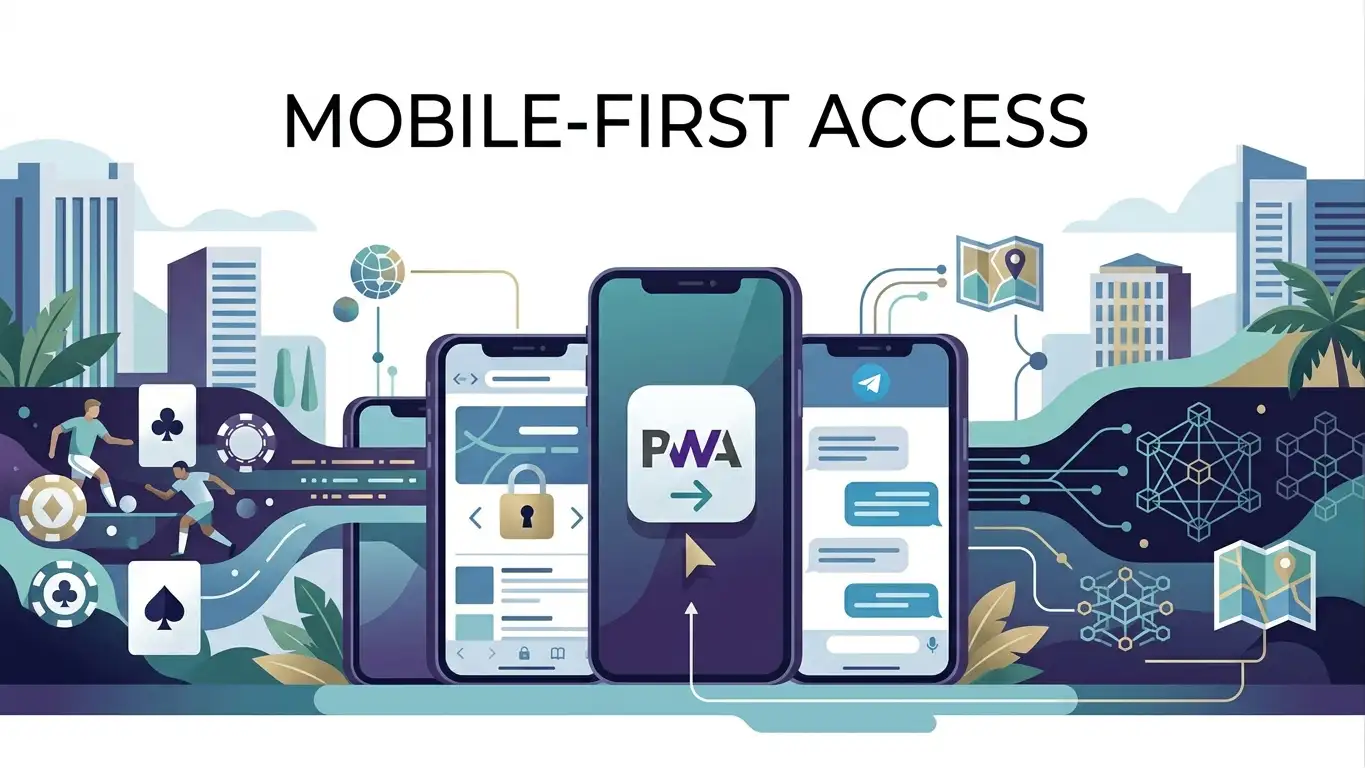
Four ways to access CHEXX
The four CHEXX access formats are the website, PWA, Telegram Mini Apps and desktop clients. They serve different habits rather than representing four separate CHEXX products. The website is the zero-install option, the PWA adds a home-screen experience, Telegram keeps access inside the messaging platform, and the macOS/Windows clients provide a dedicated desktop route.
The account itself does not become a different account when the access format changes. A player can choose the format that best matches the device without expecting a separate mobile-only balance or catalogue.
Mobile website
The website is the simplest phone option because it does not require installation. A player opens CHEXX in a supported browser, signs in and uses the product directly from the web interface. This is useful for occasional use, shared-device avoidance and users who do not want another icon or installed application.
Using CHEXX in the browser also keeps the domain visible, which is useful when confirming that the player is on the correct CHEXX site before entering credentials. The main limitation is convenience: the user returns through the browser rather than launching a dedicated home-screen app.
PWA versus a native app
A Progressive Web App is a website that can behave more like an installed application. CHEXX’s PWA can be added through the browser and opened from the home screen, but it is not a native iOS or Android application distributed through an app store.
That distinction matters for search and installation. A player looking for CHEXX in Google Play or the App Store should not expect an official native listing based on CHEXX’s listed access options. The correct app-like route is the browser-installed PWA.
What changes after PWA installation
The main benefit of the PWA is quicker repeat access. Instead of navigating through browser bookmarks or history, the user can open CHEXX from a home-screen icon. The underlying product is still web-based, so the PWA should be viewed as a convenience layer rather than a separate mobile platform.
This also means the PWA does not create different casino or sportsbook rules. It changes how the interface is launched, not the account, supported currencies, game catalogue or betting section.
PWA installation incentive
CHEXX lists a reward for the PWA installation or push-notification target action: 10 free spins at 0.2 USD each, with 1x wagering, a seven-day period and a maximum cashout of 20 USDT. These are promotion conditions tied to the target action rather than technical requirements for using CHEXX.
The incentive is separate from the main three-deposit welcome package. Installing the PWA should therefore be evaluated first as an access preference; the free spins are an additional reward, not a reason to describe the PWA as a native app.
Telegram Mini Apps and @ChexxBetBot
CHEXX also provides Telegram Mini App access through @ChexxBetBot. This gives Telegram-first users a way to open the product inside an environment they may already use daily, without installing a conventional casino application.
Telegram Mini App access is especially distinct from the PWA because it depends on the Telegram ecosystem rather than the phone browser’s installation feature. Players should verify the official bot name before interacting with it and avoid treating similarly named unsolicited accounts as official CHEXX access points.
@ChexxBetBot and @ChexxSupportBot have different roles
CHEXX separates game access and customer support on Telegram. @ChexxBetBot is the game-access bot, while @ChexxSupportBot is the support channel. The difference is easy to miss because both names use the CHEXX brand and both operate inside Telegram.
Account, login or support questions should go to the support bot rather than the game-access bot. Keeping the two roles clear is also a useful security check when a player receives a message that asks for account information.
Desktop clients for macOS and Windows
CHEXX lists downloadable desktop clients for macOS and Windows. These are the dedicated computer options for users who prefer an application window rather than a browser tab. They are separate from the phone-oriented PWA and Telegram Mini App routes.

Desktop clients make the most sense for users who spend longer sessions on a computer, use larger screens or simply prefer a dedicated program. Players who move between desktop and phone can still use the same CHEXX account through the available access formats.
Which access format fits which user?
| Format | Best fit | Main distinction |
|---|---|---|
| Website | Occasional or zero-install use | Runs directly in the browser |
| PWA | Regular phone use | Home-screen launch without an app store |
| Telegram Mini App | Telegram-first users | Access through @ChexxBetBot |
| macOS/Windows client | Dedicated desktop use | Downloadable computer client |
The best choice depends on device habits rather than a difference in the underlying CHEXX account.
Using casino and sportsbook features on mobile
The access format does not create a separate mobile catalogue. The main games on mobile page covers CHEXX’s casino library, while the mobile sportsbook page covers sports and esports. This page stays focused on how the product is opened rather than repeating game and betting inventories.
Account creation is also handled separately. The sign in and registration guide explains email, Google, Telegram and WalletConnect.
Security on browser, PWA and Telegram
Use the official CHEXX domain before installing the PWA, protect the phone with a device lock and avoid storing login credentials on a shared device. Telegram users should verify the exact bot name, while desktop users should obtain the client from the official CHEXX access flow rather than an unrelated download source.
A PWA icon can make access feel like a native application, but it does not remove the need to verify the origin. The same caution applies to wallet prompts and Telegram messages that request sensitive information.
Switching devices does not require a new account
Moving from the mobile website to the PWA, Telegram Mini App or desktop client is an access change, not a new registration. Players should use the same account identity rather than create duplicate accounts simply because they changed devices.
CHEXX does not list a native iOS or Android app. Mobile access instead uses the browser/PWA route and Telegram Mini App, while desktop users can also use the Windows and macOS clients. The CHEXX Philippines review places those access options alongside the wider casino and sportsbook product.
No app-store download changes the installation check
Because CHEXX does not list a native App Store or Google Play application, users should not judge authenticity by an app-store publisher page. The relevant check is the official CHEXX website or official Telegram route. A third-party app claiming to be the native CHEXX mobile application would not match CHEXX’s listed access formats.
This is also why the PWA distinction matters. A home-screen icon can look similar to a native app icon, but the installation originates from the browser. The absence of an app-store listing is therefore not a missing feature that needs to be worked around with an unofficial APK or package.
Browser and PWA suit different usage frequency
For occasional use, the browser is simpler because there is nothing to install or manage. For frequent use, the PWA reduces the number of steps needed to return to CHEXX and gives the product a more dedicated place on the home screen. Both routes still depend on the web version of CHEXX rather than separate mobile software.
A player can therefore choose based on convenience without expecting different game access or account rules. If the browser experience is sufficient, the PWA is optional. If a home-screen shortcut is valuable, the PWA is the more direct route.
Telegram access is convenient but account security still matters
Telegram Mini Apps reduce switching between apps for users who already spend time in Telegram, but they also make the security of the Telegram account more important. A compromised Telegram session can affect access to services connected through that account.
Using a device lock, Telegram’s own account protections and careful bot-name verification is more useful than relying on visual familiarity alone. CHEXX’s separate @ChexxBetBot and @ChexxSupportBot names should be checked character by character before a user shares account details or opens the game-access flow. An account comes first: registration.
Desktop clients are useful for longer sessions
A dedicated macOS or Windows client can be more comfortable for users who prefer a larger display, persistent application window or keyboard-and-mouse navigation. That does not make the desktop client a different CHEXX product; it is another access layer for the same account.
Players who alternate between phone and computer do not need to choose one format permanently. A common pattern is browser or PWA use on mobile and the desktop client for longer sessions at home. The main requirement is to keep the original login method available across devices.






 Single Deck Blackjack GoldSingle Deck
 Quantum Blackjack PlusMultiplier
 Ultimate Blackjack with RachaelLive-style
 European BlackjackMultihand
 Double Exposure BlackjackDouble Exposure
 Classic BlackjackClassic
 Turbo BlackjackFast-play
 VIP American BlackjackVIP
 Blackjack Surrender OriginsSurrender
 Perfect Pairs BlackjackSide Bet
 Vegas Downtown Blackjack GoldGold Series
 Blackjack 21 ClassicClassic
 Atlantic City BlackjackClassic
 Premier Blackjack with Side BetsSide Bet
 Blackjack Lucky LadiesSide Bet
 Roca Riches RouletteThemed
 Monopoly Roulette TycoonThemed
 RouletteRelax Gaming
 Immortal Romance RouletteThemed
 Mini Roulette 3DMini
 Dragon RouletteThemed
 Auto RouletteSwitch Studios
 Gold RouletteGold Series
 Quantum RouletteMultiplier
 French RouletteNetEnt
 Multifire RouletteMultiplier
 American RouletteClassic
 Lucky RouletteClassic
 Who Wants to Be a Millionaire RouletteThemed
Prepared by the Chexx Casino editorial staff.